Extract the color palette from a logo
Free and in your browser: the logo's main colors as exact HEX codes, plus an .ase swatch file with just those colors.
 JPG · 400 px
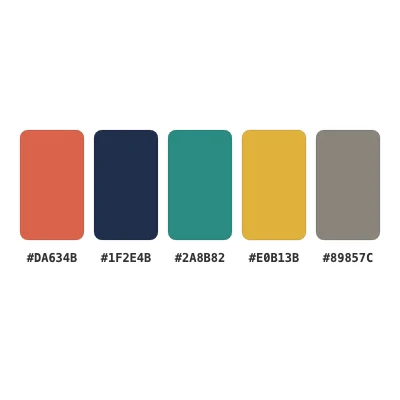 5 colors · HEX
How to Use
Choose the logo and it is traced in your browser with the 6 Colors preset, white left out. Each color is then matched back to the exact color the picture uses most, the traced paths take that exact color too, and the card lists them as blocks with their HEX codes, largest first. Click a block to copy its code. Download .ase saves just these colors as a swatch file, and the traced logo stays on the artboard as paths you can edit.
- Click Choose a logo, or drop the file on the page. It is traced at once and the card lists the colors with their HEX codes.
- Click a block to copy that code, or Copy HEX codes for the whole list, one per line. The Color panel shows the clicked color; switch its menu to CMYK for an estimate.
- Click Download .ase to save just these colors as a swatch file.
- To recolor your own design with them, open it, load the .ase from the Swatches panel menu with Open Swatch Library > Other Library…, select the artwork and choose Edit > Edit Colors > Recolor Artwork….
| Opens | JPG, PNG, WebP, GIF; an SVG, PDF, .ai or EPS lists its own colors without tracing |
|---|---|
| Gives | Up to 6 colors as HEX, largest first; an .ase with just those colors |
| Tested | 29 Oct 2026, a 400 px JPEG logo with five colors on white: all five found, three exact (#1F2E4B, #2A8B82, #E0B13B), two within 3 levels (#DA634B for #D9644B, #89857C for #8C8579); white left out |
| Where it runs | In your browser; nothing is uploaded, no account |
JPEG compression can move a value by a level or two, a gradient becomes two or three blocks, and a very thin outline may be folded into the color next to it. White is left out on purpose; a logo that really uses white keeps it in the Swatches panel, not in this list. CMYK is worked out from the RGB, not from a press profile: use the brand guide's values when you have them.
- How do I get the exact HEX codes of my logo's colors?
- Choose the logo here: the card lists its main colors with their HEX codes, each matched to the exact color the picture uses most. Click a block to copy it.
- Can I get CMYK values for print?
- As an estimate: click the block and set the Color panel to CMYK. For a press run, ask the printer or the brand owner for the values.
- What is an .ase file and where do I use it?
- A swatch exchange file that most design programs can load. Here, open it from the Swatches panel menu with Open Swatch Library > Other Library….
- Is my logo uploaded?
- No. The tracing and the color matching run in your browser; the picture stays on your computer.
RelatedChange the color of an SVGConvert a PNG to SVGEdit an SVG file