Separate the colors of a logo for screen printing
Split a logo into its ink colors, one plate each, in seconds, free.
 JPG · 700 px
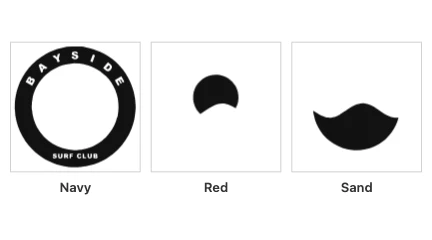 PDF · 3 inks
How to Use
Choose the logo and it is traced into flat shapes, one ink per color, with the white left unprinted. Set the number of inks; each color becomes a spot ink named after it. For a print shop, download the separated PDF: one page, each ink a plate their RIP outputs. To print films yourself, download the films PDF: one page per ink in solid black, with registration marks and the ink's name.
- Click Choose the logo, or drop a JPG or PNG on this card. It is separated at once into 3 inks, 280 mm wide; the white background and anything white in the art stay unprinted.
- Type the number of inks in Inks. The logo is traced again into that many colors; fewer inks merge the colors closest to each other.
- Under Plates, click an ink to see its plate alone on the artboard; All shows them together. Type the print width in mm.
- For a print shop, click Download PDF (or Other formats... for an EPS): one page, each ink a separate plate named after its color, for their RIP. Printing films yourself, click Download films: one page per ink in solid black, with registration marks and the ink's name; turn on Mirrored if you print films reversed, emulsion side down.
| Formats | JPG or PNG in; separated PDF or EPS for a print shop, films PDF (one page per ink, black) to print yourself |
|---|---|
| Limits | 1 to 8 inks; a copy of at most 1360 px on its long side and 1.5 megapixels in all is traced |
| Where it runs | In your browser, no account |
This is for flat artwork printed on a light shirt or paper: white is left out as the color of the shirt, so it gets no plate, and there is no white underbase for dark fabric yet. A photo or a soft gradient needs halftones, which this page does not make; it comes out as bands of flat color. The separated PDF needs a RIP or separation software to split it into plates: opened in an ordinary PDF reader it shows the colors together. The films PDF is the one to print at home, a page per ink, at 100% on transparent film. No CDR. The ink colors are the picture's own RGB colors, not Pantone numbers; tell your shop which inks you want.
- How many inks should I use?
- As many as the logo has flat colors, not counting white. Each ink is a screen and a pass on the press, so fewer inks cost less; ask your shop what they charge per color.
- Do I get one film per ink?
- Yes, as a PDF to print: Download films gives one page per ink in solid black, each with registration marks and the ink's name, mirrored if you ask. Print it at 100% on transparent film. Download PDF is the separated file a print shop's RIP turns into films.
- Can it separate a photo or a gradient?
- No. Those need halftone dots, which this page does not make. A gradient comes out as a few bands of flat color.
- Is the logo uploaded? Do I need an account?
- No. The tracing, the inks and the downloads are made in your browser, with no account.
RelatedVectorize a low-res logo for signs, vinyl and screen printingVectorize an image