Click to select, drag to move. Shift adds to the selection, Alt-drag copies. Drag a handle to scale, drag just outside a corner to rotate.
AI AssistantOffline ⓘ
Describe what you want to draw or change
The AI edits real vector objects on your canvas: generate artwork, recolor, arrange, align, run Pathfinder ops… Every AI change is a single undo step (⌘Z).
Nothing selected — prompts apply to the whole artboard
Vp
+ New file
Open
Home
Learn
Open Adobe Illustrator (.ai) files online, free
View and edit .ai files without Illustrator. Vectorpip reads .ai files saved PDF-compatible — Illustrator's default — with their paths, layers, text and gradients, so you can check a logo, change a color or a word, and export SVG, PDF or PNG. Very old .ai files saved without PDF content can't be opened. The file never leaves your computer.
Adobe Illustrator is a trademark of Adobe Inc. Vectorpip is an independent product, not affiliated with Adobe.
Quick start a new file
Letter
612 × 792 px
A4
595 × 842 px
Postcard
432 × 288 px
Web
1920 × 1080 px
Mobile
390 × 844 px
Square Post
1080 × 1080 px
Story
1080 × 1920 px
Icon
512 × 512 px
Business Card
252 × 144 px
+
More presets…
Open documents
Welcome
1 artboard
Examples
Summer Poster
Freeform gradient, live radial repeat, 3D title, brush strokes
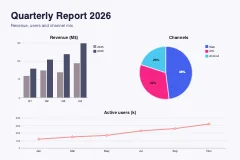
Infographic
Graphs, global color group, grid layout
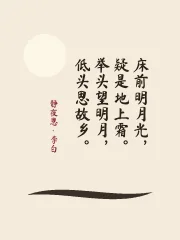
Quiet Night Thoughts
Vertical type, Chinese web fonts, ink brush
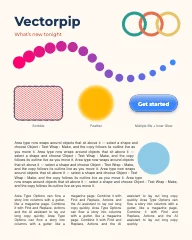
What's New
Intertwine, blend spine, scribble, feather, glossy fills, text wrap, columns
Discover
✦
Edit with AI
Describe a change — the assistant edits real, editable vectors (works offline too).
▦
Text to Pattern
Generate a seamless pattern swatch from a prompt.
✎
Shaper tool
Draw a rough shape (Shift+N) — get a clean rectangle, circle or polygon.
Appearance panel: stack fills with their own opacity and blend mode.
▶
Actions
Record commands, transforms and AI prompts; replay them on any selection.
⟁
Perspective Grid
Shift+P: two-point grid; Object › Perspective attaches art to a plane.
Aa
Touch Type
Shift+T: move, scale and rotate single characters — text stays editable.
⊞
Mesh & gradient strokes
Mesh tool (U) colour points; strokes with gradients along or across.
⌗
Text Wrap & columns
Area type flows around shapes and into columns with a gutter.
Vp
☰
Welcome
No SelectionStroke:Opacity:
Welcome @ 2% (RGB/Preview)
1 / 1SelectionX: 0.0 Y: 0.0
AI AssistantOffline ⓘ
Describe what you want to draw or change
The AI edits real vector objects on your canvas: generate artwork, recolor, arrange, align, run Pathfinder ops… Every AI change is a single undo step (⌘Z).
Nothing selected — prompts apply to the whole artboard
Vp
+ New file
Open
Home
Learn
Open Adobe Illustrator (.ai) files online, free
View and edit .ai files without Illustrator. Vectorpip reads .ai files saved PDF-compatible — Illustrator's default — with their paths, layers, text and gradients, so you can check a logo, change a color or a word, and export SVG, PDF or PNG. Very old .ai files saved without PDF content can't be opened. The file never leaves your computer.
Adobe Illustrator is a trademark of Adobe Inc. Vectorpip is an independent product, not affiliated with Adobe.
Quick start a new file
Letter
612 × 792 px
A4
595 × 842 px
Postcard
432 × 288 px
Web
1920 × 1080 px
Mobile
390 × 844 px
Square Post
1080 × 1080 px
Story
1080 × 1920 px
Icon
512 × 512 px
Business Card
252 × 144 px
+
More presets…
Open documents
Welcome
1 artboard
Examples
Summer Poster
Freeform gradient, live radial repeat, 3D title, brush strokes
Infographic
Graphs, global color group, grid layout
Quiet Night Thoughts
Vertical type, Chinese web fonts, ink brush
What's New
Intertwine, blend spine, scribble, feather, glossy fills, text wrap, columns
Discover
✦
Edit with AI
Describe a change — the assistant edits real, editable vectors (works offline too).
▦
Text to Pattern
Generate a seamless pattern swatch from a prompt.
✎
Shaper tool
Draw a rough shape (Shift+N) — get a clean rectangle, circle or polygon.