
You draw in Inkscape at home, and the computer in front of you is a Chromebook or a work laptop with nothing installed. The table shows what carries over to Vectorpip.
| Task | Here | Notes |
|---|---|---|
| Open an SVG saved by Inkscape | Yes | Pages in mm open at their size; layers become named groups; object labels are kept |
| Inkscape filters and clones | Partly | Filters Vectorpip knows become effects, the rest are left out; clones arrive as separate copies |
| Open .ai, PDF, EPS, PSD, DXF | Yes | An EPS that Inkscape wrote runs through a PostScript interpreter |
| Save .ai, PDF, EPS, SVG | Yes | .ai, PDF and EPS: File > Save As…; SVG and PNG: File > Export > Export As…. In a PDF the type is drawn as its letter shapes, with fonts embedded as subsets |
| Combine shapes, trace a bitmap | Yes | Shape Builder tool (Shift+M), Pathfinder panel, Object > Image Trace > Make |
| Describe an edit in words | Yes | The AI assistant draws or changes the artwork from a sentence, as objects you can edit; it needs a sign-in and is free to try with a new account |
| Extensions and add-ons | No | There is no extension system |
| Fonts | Yes | Your computer's fonts (in Chrome and Edge, once you allow it), web fonts, and .otf, .ttf or .woff files you add |
“Here” is checked in Vectorpip and its list of known limitations on 2026-10-30. The first column names the task.
Tested: an Inkscape-format SVG opened here
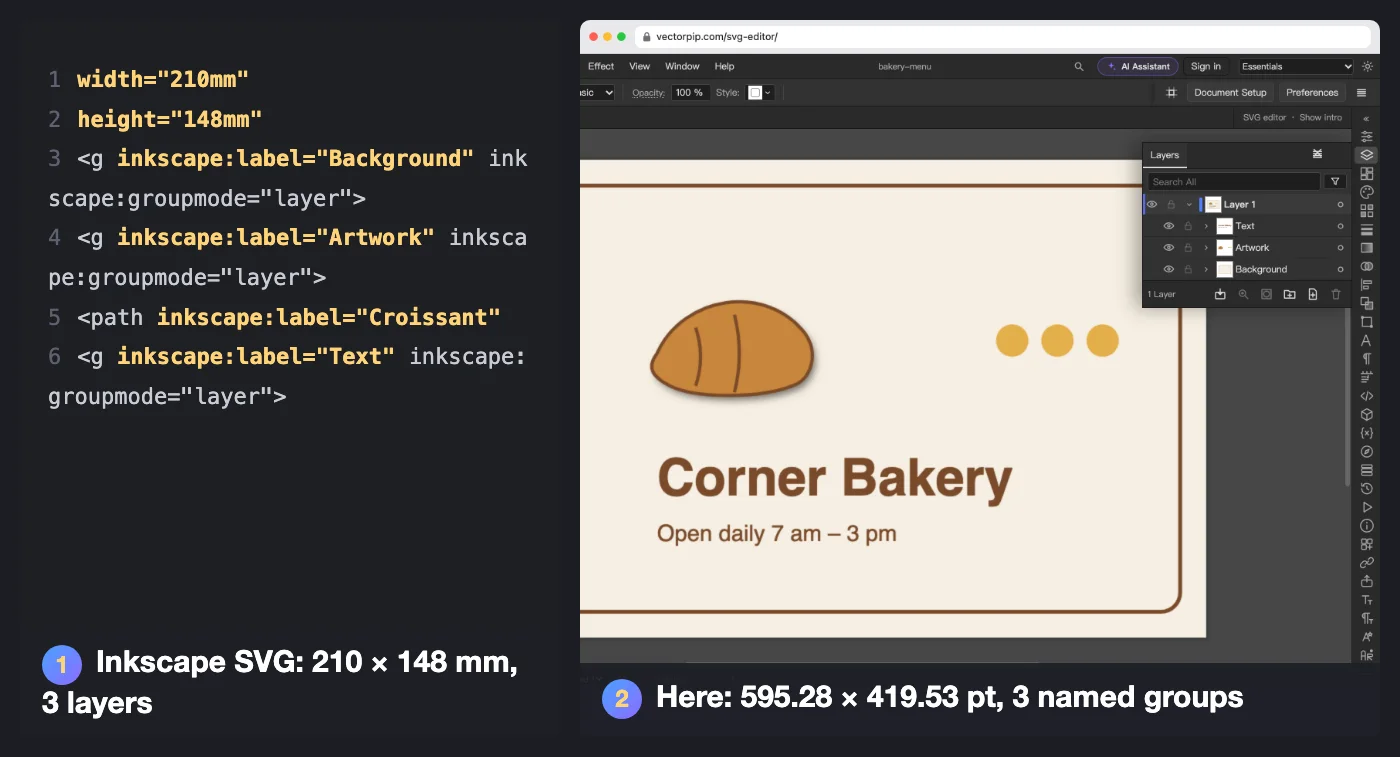
We wrote a test file the way Inkscape 1.3 saves an Inkscape SVG — a page set in millimetres, three layers, object labels, a drop-shadow filter and two clones — and opened it in Vectorpip on 2026-10-29.
| In the file | After opening |
|---|---|
| Page 210 × 148 mm | Artboard 595.28 × 419.53 pt, the same size |
| Layers Background, Artwork, Text | Three groups with those names, inside Layer 1 |
| Object labels (Croissant, Shop name…) | Kept as the objects' names in the Layers panel |
| Drop-shadow filter | Became a live effect on the croissant |
| Two clones of a dot | Two separate copies, named after the original |
| Text in sans-serif | Editable type; a font this computer lacks would be marked and listed in Type > Resolve Missing Fonts… |
The test file follows Inkscape's SVG structure by hand; it was not saved by Inkscape itself.
How the two differ
According to the Features of Inkscape page on inkscape.org (read 2026-10-20), Inkscape is free software built around SVG, with a customizable interface, more than 150 built-in extensions and a Python extension API, live path effects and over 250 filters, and it exports PNG, PDF, AI, EPS and DXF among others.
Vectorpip is a vector editor that opens in a browser tab, with menus and shortcuts laid out as in Illustrator. It is free to use but not open source, and it has no extensions.
Start in four steps
- Click Open an SVG and pick a file Inkscape saved.
- Open the Layers panel. Inkscape’s layers come in as named groups inside one layer.
- Draw with the Pen (P), select points with the Direct Selection tool (A), set type with the Type tool (T), and combine shapes with the Shape Builder tool (Shift+M).
- Choose File > Save As… to write .ai or PDF for someone who uses Illustrator, or File > Export > Export As… for SVG or PNG. The file is written on your device; nothing is uploaded.
Note: an SVG with more than 120 MB of markup or 250,000 elements does not open.
Sources and dates
- Inkscape’s interface, extensions, path effects, filters and export formats: the Features of Inkscape page on inkscape.org, read 2026-10-20.
- What opens and saves here and how an Inkscape SVG comes in: Vectorpip itself and its list of known limitations, checked 2026-10-30, and the test file above, opened 2026-10-29.
- Vectorpip is not affiliated with the Inkscape project.
Next steps
- Edit an SVG for the web: the SVG editor.