
KDP trims every page 0.125 in off its top, bottom and outside edge; the binding edge is not trimmed. So a page that prints to the edge has to be made 0.125 in wider and 0.25 in taller than the trim, and if one page needs that, the whole file does.
| Trim size | Page size with bleed | Outside, top, bottom | Gutter | Note |
|---|---|---|---|---|
| 5 × 8 in | 5.125 × 8.25 in | 0.375 in | 0.375–0.875 in | |
| 5.5 × 8.5 in | 5.625 × 8.75 in | 0.375 in | 0.375–0.875 in | |
| 6 × 9 in | 6.125 × 9.25 in | 0.375 in | 0.375–0.875 in | The most common trim |
| 7 × 10 in | 7.125 × 10.25 in | 0.375 in | 0.375–0.875 in | Large trim |
| 8.5 × 8.5 in | 8.625 × 8.75 in | 0.375 in | 0.375–0.875 in | Picture books |
| 8.5 × 11 in | 8.625 × 11.25 in | 0.375 in | 0.375–0.875 in | Workbooks; large trim |
Gutter by page count: 24–150 pages 0.375 in, 151–300 0.5 in, 301–500 0.625 in, 501–700 0.75 in, 701–828 0.875 in. Without bleed, the outside, top and bottom margins are at least 0.25 in. Page sizes worked out with KDP's formula.
Why a bigger page isn’t enough
Bleed is the strip the trimmer cuts away. Making the page 6.125 × 9.25 in gives you that strip, but only a picture that runs into it reaches the edge of the printed page; a picture that stops at the trim line comes out with a white sliver after trimming. The strip is on three sides only, because the fourth edge is glued into the spine.
What we measured
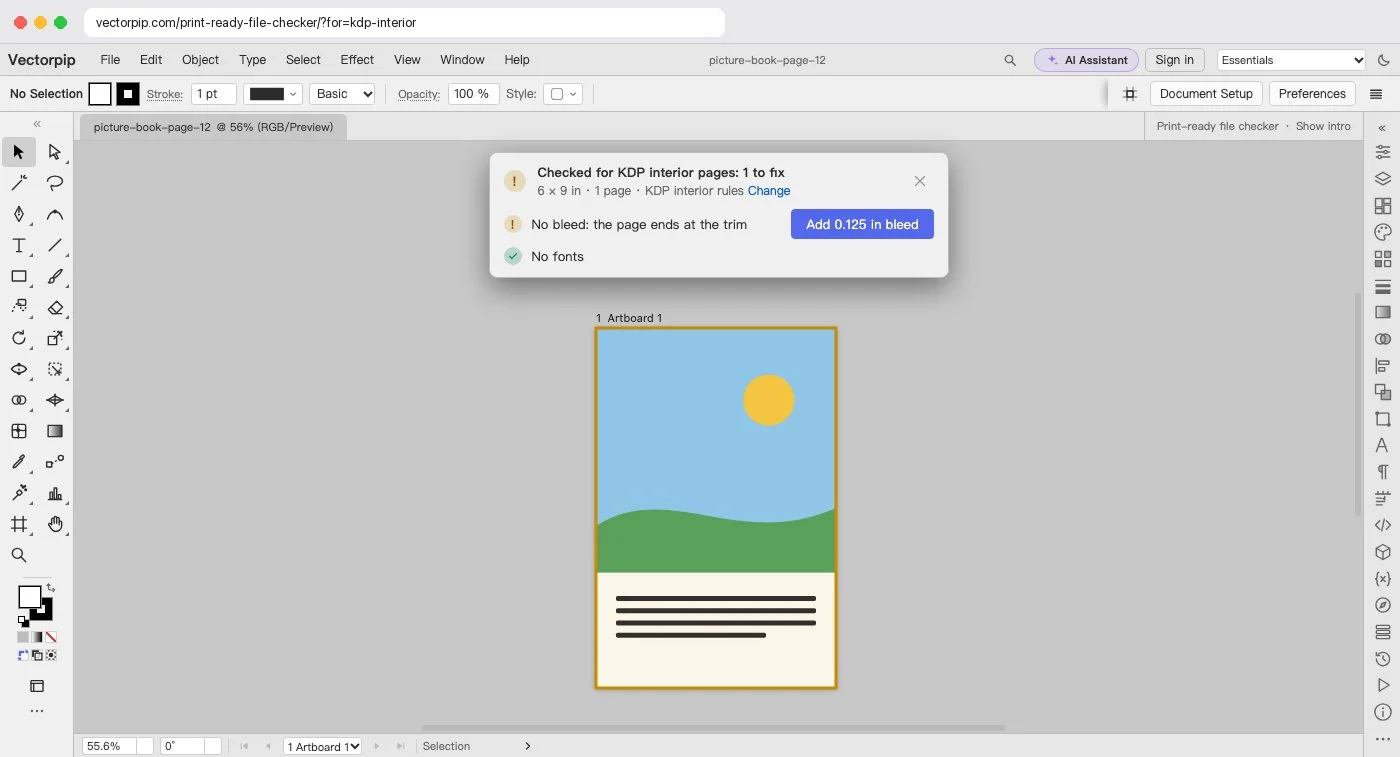
Tested 2026-10-29 with a made-up picture-book page (sky, hills and a text block) exported from Vectorpip twice and opened in the checker with KDP interior rules:
| PDF page | The checker says | After its fixes |
|---|---|---|
| 6 × 9 in, art to the edge | 1 to fix: no bleed, the page ends at the trim | Add 0.125 in bleed, then Extend art into the bleed: all pass, bleed 0.125 in on 3 sides |
| 6.125 × 9.25 in, art to the edge | Nothing to fix: the bleed is already in the page | No change needed |
Single pages, no fonts; a whole book with type is checked the same way but fixed in your layout program (see the note below).
Check your interior PDF
- Click Check your interior PDF and choose the PDF you exported from your layout program. If it has more than 12 pages, pick the first page and one page with a picture to the edge.
- The card checks the page size and the bleed against KDP interior rules: 0.125 in on the outside, top and bottom, none on the binding edge. On a picture page it can add the bleed and stretch the art into it for you.
- Zoom in on a picture page. The artboard’s edge is the trim and the red line outside it the edge of the bleed: the picture must run past the trim up to the red line, and text must stay 0.375 in inside the trim.
- For the whole book, fix the page size and the pictures in your layout program and export it again; this page checks a book, it does not rewrite one. A single picture page you can fix here: click the card’s fixes, then Save PDF.
Note: A PDF opened here is set in the fonts this computer has, and its CMYK colors come in as RGB, so don’t save the whole interior again from here. Use it to read the real size and see the edges.
Sources and dates
- Amazon KDP help: “Set Trim Size, Bleed, and Margins” (page size with bleed, trimmed edges, whole file at bleed size, gutter and outside margins), read 2026-10-27.