
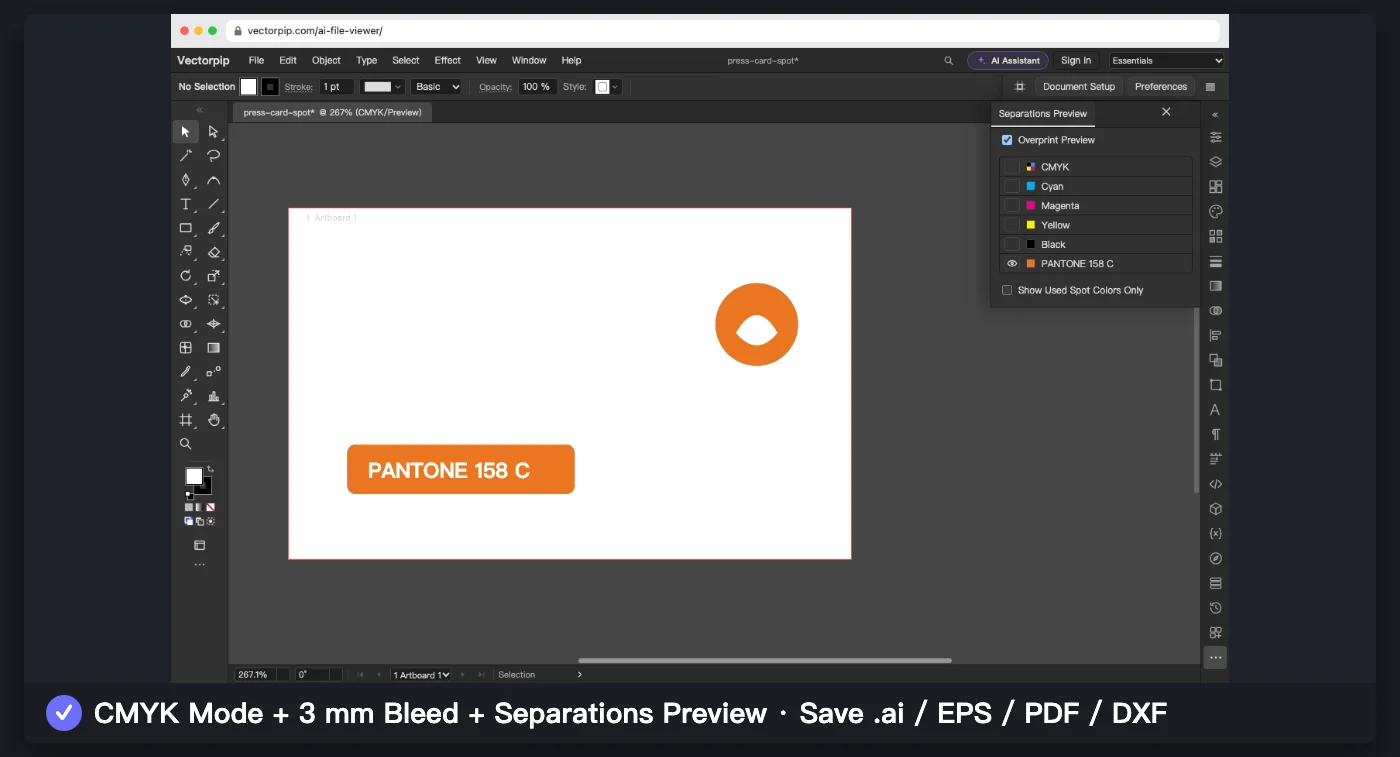
Teams often design logos, event posters, folding cartons, or packaging stickers inside Figma because the browser canvas feels responsive, until a print shop asks for a CMYK PDF/X with 3 mm bleed, named CutContour spot ink plates, outlined EPS files, or millimeter DXF geometry for laser cutting.
| Capability | Figma | Vectorpip |
|---|---|---|
| Installation & platform | Browser + desktop app (account required) | Browser only, opens with no account |
| UI components & multiplayer collaboration | Real-time co-editing, Auto Layout, Dev Mode | Single-user local documents (no live team comments) |
| Free tier limits | Starter: 3 files, 3 pages/file (paid seat $16/mo annual) | Unlimited local documents & exports with no file cap |
| CMYK color & proof preview | sRGB / Display P3 native; CMYK needs plugins | Document Color Mode CMYK + 4 press Proof setups |
| Spot swatches & separations | Not built in | Spot swatches (CutContour or numbered ink) + Separations Preview |
| Bleed, trim marks & PDF/X | Standard PDF 1.7 only (no native bleed/marks) | Document Setup bleed, Trim Marks, PDF/X presets & Preflight |
| Print & machine file formats | Exports SVG, PDF 1.7, PNG, JPG (no EPS/AI/DXF) | Opens & saves .ai, EPS, PDF, SVG; exports DXF (mm) |
| AI tools & local rules | UI AI credits on Starter/Pro plans | Local Ctrl+K batch actions free; 2 free cloud tries/30d + credits |
Figma plan and export facts read from figma.com & help.figma.com (2026-11-24). Vectorpip capabilities tested in the browser editor on 2026-11-24.
How the two tools split the job
According to Figma’s official documentation and pricing page (read 2026-11-24), Figma runs in digital sRGB and Display P3 spaces, exports SVG, PDF 1.7, PNG, and JPG, limits Starter accounts to 3 collaborative team files and 3 pages per file ($16/mo billed annually or $20/mo monthly for a Professional Design seat), and relies on community plugins for CMYK print separation or bleed marks.
Vectorpip follows a traditional Illustrator-style toolbox built around single-user vector files and commercial handoff: open .ai, EPS, PDF, or SVG directly on your computer, switch to CMYK Proof Colors, outline typography, inspect Separations Preview, trace bitmaps, and write press-ready files with zero cloud upload.
What transfers directly from Figma (and what does not)
Because Figma uses Auto Layout frames, shared component instances, and sRGB styles rather than traditional PostScript print containers, moving artwork across requires a format bridge:
| Source from Figma | What transfers directly | Notes & local limits in Vectorpip |
|---|---|---|
| SVG export | Editable vector paths, fills, strokes, and named layer groups | Check Outline text in Figma’s SVG export panel if your machine lacks the display font, or convert with Type > Create Outlines after fonts load. Figma effects such as heavy background blur may flatten or rasterize during SVG export. |
| PDF 1.7 export | Multi-page decks and print mockups containing vector shapes | Vectorpip opens standard PDF vector shapes and lets you run Print-Ready File Checker or File > Document Setup… to add 3 mm bleed guides around each artboard. |
| Native .fig / live team sync | Not supported | Opens local files up to 120 MB SVG markup (400 MB total file, 250,000 elements), 400 MB EPS/DXF, or 2 GB PDF/.ai on your own machine only. Design tokens, component overrides, and multiplayer comments stay inside Figma. |
Move artwork from Figma to print or cut in four steps
- In Figma, export the finished frame as SVG (to keep editable vector paths) or PDF. Vectorpip cannot open .fig files natively.
- Click Open SVG from Figma (or choose File > Open… for a PDF), inspect layers in the Layers panel, and check fonts via Type > Resolve Missing Fonts….
- Prepare for press or cutting: select artwork and run Type > Create Outlines (Ctrl+Shift+O / Cmd+Shift+O), add 3 mm / 0.125 in bleed in File > Document Setup…, switch to View > Proof Colors, or define a custom Spot ink in Swatches and verify channels in Window > Separations Preview.
- Export the deliverable via File > Save As… (.ai PDF-compatible, EPS, PDF [Press Quality] or [PDF/X-1a:2001], SVG) or File > Export > Export As… (DXF in millimeters by default or matching chosen output units, 300 ppi PNG, or inspect styles via Window > CSS Properties). Files stay in your browser and never upload for local work.
Note: Vectorpip stores documents in sRGB internally and runs formula CMYK conversion rather than custom ICC lookup tables (hand-entered Spot and Swatch CMYK values write verbatim to CMYK PDFs, and [Press Quality] enables document bleed by default; expand Marks and Bleeds and check Trim Marks manually when corner crop guides are required). Always request a physical press proof for color-critical packaging, metallics, or uncoated specialty stocks.
Sources and dates
- Figma Starter/Professional seat pricing ($16/mo annual, $20/mo monthly) and native sRGB/P3, PDF 1.7, and non-EPS export specs: Figma Pricing & Export documentation, read 2026-11-24.
- Vectorpip .ai/EPS/PDF/SVG/DXF export formats, 4 CMYK proof spaces, Separations Preview, file limits (120 MB SVG markup / 400 MB total SVG, EPS & DXF / 250,000 elements / 2 GB PDF & .ai), and AI trial limits: tested in Vectorpip (2026-11-24).
- Vectorpip is not affiliated with Figma, Inc.
Next steps
- Need exact press prep before uploading to print: preview CMYK vs RGB shifts.
- Sending lettering to Cricut, Glowforge, or CNC: read the laser cut file guide.
- Already have an exported PDF missing edge margin: add bleed to an existing PDF.